
Flowith Review 2026: Beyond Chat – Multi-Threaded AI Creation Powerhouse?
In the rapidly evolving landscape of AI tools, many platforms promise to revolutionize content creation. However, few deliver on the scale and sophistication that Flowith claims. As senior tech writer and product analyst for WiseRankr.com, I've had extensive hands-on experience with hundreds of AI and SaaS tools. My deep dive into Flowith, a platform boasting over 1 million global users and 20 million agent requests, reveals whether it truly lives up to its reputation as the #3 Product of the Month on Product Hunt and a tool trusted by tech leaders like MIT Tech Review.
Flowith positions itself as an AI creativity platform enabling "multi-threaded creation beyond chat." This isn't just another chatbot wrapper; it's an ecosystem designed for complex, iterative, and collaborative AI-powered workflows. In 2026, where AI integration is no longer a luxury but a necessity, Flowith's approach to orchestrating multiple AI agents and models for a singular creative goal is particularly compelling.
Flowith Overview: What is Multi-Threaded AI Creation?
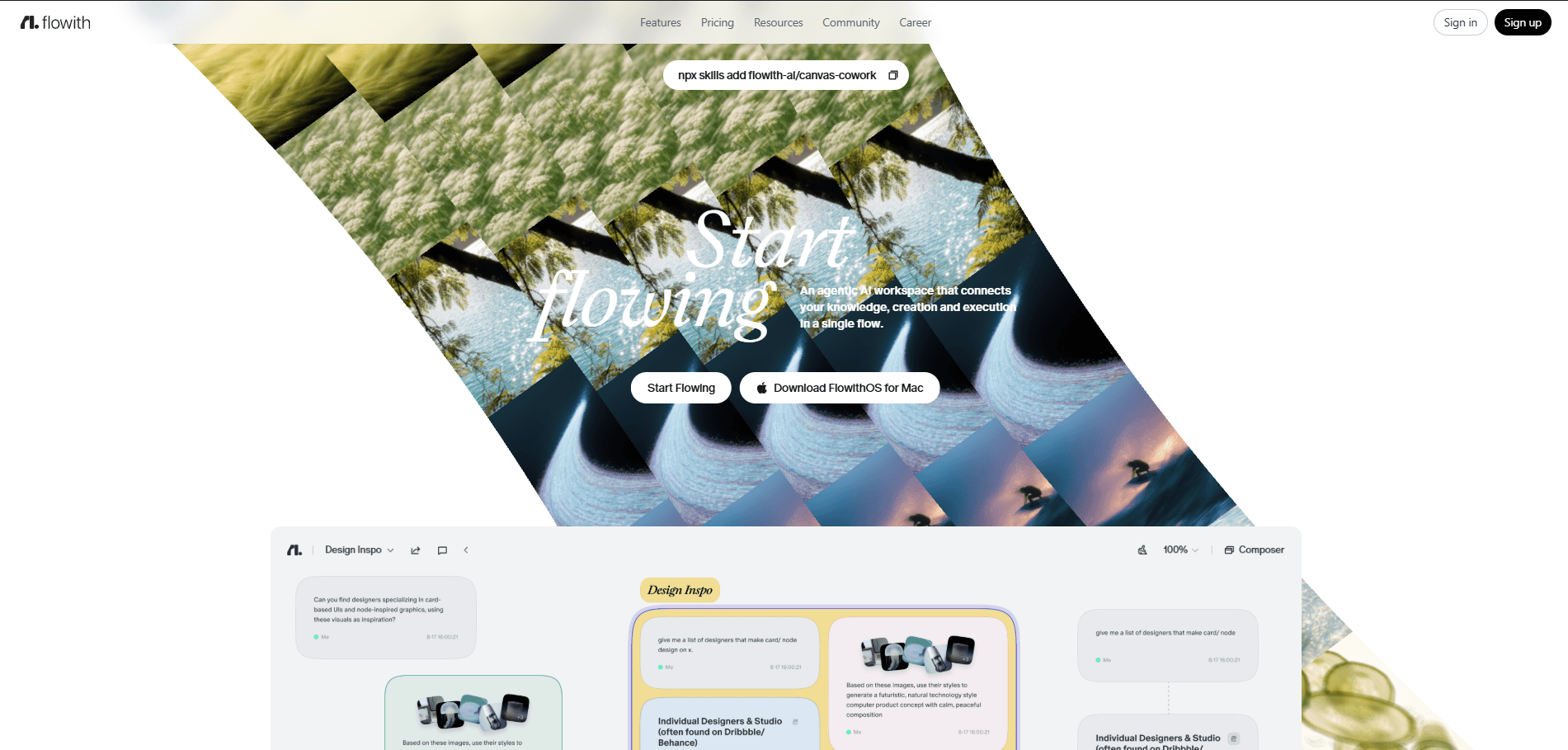
At its core, Flowith offers a visual canvas where users can design intricate AI workflows. Instead of simply prompting a single large language model (LLM) and hoping for the best, Flowith allows you to chain together various AI "agents" – each specialized for a particular task. Think of it as a low-code/no-code environment for building sophisticated AI pipelines. These agents can range from content generation (text, image, code) to research, summarization, analysis, and even integration with external data sources. The "multi-threaded" aspect refers to the platform's ability to run multiple AI processes concurrently or sequentially, feeding the output of one agent as the input to another, thereby mimicking a more human-like, iterative creative process.
The platform aims to move users beyond the limitations of single-turn chat interactions with AI. While tools like ChatGPT or Claude are excellent for quick queries, they often fall short when tackling multi-stage projects requiring diverse AI capabilities and structured outputs. Flowith seeks to fill this gap, providing a structured, repeatable, and scalable way to leverage AI for complex creative and analytical tasks.
Key Features of Flowith
Flowith distinguishes itself through a suite of powerful features designed for advanced AI workflow orchestration:
Visual Flow Builder & Agent Canvas
The centerpiece of Flowith is its intuitive drag-and-drop visual interface. Users can select from a library of pre-built AI agents or create custom ones and then connect them on a canvas to define a workflow. For instance, you could have an "Outline Generator" agent feed into a "Section Writer" agent, which then passes its output to a "Grammar Corrector" agent, and finally, a "SEO Keyword Optimizer" agent. This visual representation makes complex workflows easy to understand, build, and debug. The canvas supports branching logic, conditional statements, and loops, allowing for highly dynamic and adaptive AI processes.
Extensive Agent Library & Custom Agent Creation
Flowith boasts a rich library of over 150 pre-configured agents, covering a wide array of functionalities. These include agents for text generation (e.g., blog posts, social media captions, ad copy), image generation (integrated with DALL-E 3, Midjourney, Stable Diffusion), code generation and debugging, data analysis, summarization, translation, and more. Beyond the pre-built options, advanced users can create their own custom agents using Python scripts, connecting to external APIs, or fine-tuning open-source models. This extensibility is crucial for businesses with unique AI requirements, allowing them to tailor Flowith to proprietary datasets or niche tasks.
Multi-Model Support & Orchestration
Unlike platforms locked into a single LLM, Flowith offers seamless integration with various leading AI models. Users can choose to utilize OpenAI's GPT-4 Turbo, Anthropic's Claude 3 Opus, Google's Gemini Pro, or even open-source models like Llama 3, depending on the specific task and desired output quality. The platform intelligently routes requests to the most appropriate model based on agent configuration and user preferences. This multi-model approach ensures flexibility, cost-optimization, and access to the best-in-class AI for each step of a workflow. For example, a research agent might use Gemini Pro for its web-browsing capabilities, while a creative writing agent might leverage Claude 3 Opus for its nuanced understanding of language.
Collaboration & Version Control
Designed for team environments, Flowith includes robust collaboration features. Multiple users can work on the same flow simultaneously, with real-time updates and commenting capabilities. The platform also incorporates version control, allowing teams to track changes, revert to previous iterations, and maintain an audit trail of their AI-generated content and workflows. This is invaluable for marketing agencies, content teams, and product development groups that need to maintain consistency and quality across projects.
Dynamic Inputs & Outputs with Data Connectors
Flowith isn't just about generating text; it's about integrating AI into existing data workflows. The platform supports dynamic inputs from various sources, including CSV files, databases (via API connectors), web scraping tools, and CRM systems. Outputs can be routed to different destinations, such as Google Docs, Notion, Slack, email, or custom webhooks. This capability transforms Flowith from a standalone tool into a powerful automation engine, bridging the gap between AI generation and business operations.
Performance Monitoring & Analytics
For enterprise users, Flowith provides detailed analytics and performance monitoring dashboards. Users can track agent execution times, token usage, API costs, and success rates. This data is essential for optimizing workflows, identifying bottlenecks, and managing AI expenditure effectively, especially when running millions of agent requests.
Onboarding Experience, UI/UX, and Learning Curve
Upon first logging into Flowith, the onboarding process is surprisingly streamlined given the platform's complexity. A guided tour quickly introduces the core concepts of agents, flows, and the visual canvas. The user interface is clean, modern, and intuitive, adhering to contemporary SaaS design principles. The drag-and-drop functionality for building flows is fluid, and the agent library is well-organized with clear descriptions for each agent's function.
However, the learning curve, while initially gentle for basic flows, can become steep when tackling advanced features like custom agent creation, complex conditional logic, or integrating external APIs. Flowith provides extensive documentation, tutorials, and a responsive community forum, which are crucial for mastering its full potential. For users accustomed to simple chat interfaces, the paradigm shift to building multi-step workflows requires a different mindset. But for anyone familiar with visual programming tools or workflow automation platforms (like Zapier or Make.com), the transition is relatively smooth.
Integrations
Flowith's strength lies not just in its internal capabilities but also in its ability to connect with a wide ecosystem of tools. Key integrations include:
- LLM Providers: OpenAI (GPT-4 Turbo, GPT-3.5), Anthropic (Claude 3 Opus, Sonnet, Haiku), Google (Gemini Pro, Ultra), Open-source models (Llama 3, Mistral).
- Image Generation: DALL-E 3, Midjourney (via API), Stable Diffusion.
- Document & Storage: Google Drive, Notion, Microsoft SharePoint, Dropbox, Airtable.
- Communication & Collaboration: Slack, Microsoft Teams, Discord, Gmail.
- CRM & Marketing: Salesforce, HubSpot, Mailchimp, ActiveCampaign.
- Development Tools: GitHub, GitLab, Jira.
- Automation Platforms: Zapier, Make.com (for extending Flowith's reach).
- Custom APIs & Webhooks: Allowing connection to virtually any external service.
The API documentation is comprehensive, enabling developers to embed Flowith's capabilities into their own applications or build highly customized integrations, further solidifying its enterprise appeal.
Flowith Pricing
Flowith operates on a freemium model, offering various tiers to accommodate individuals, teams, and enterprises. The pricing structure is primarily based on "agent requests" or "credits," which consume tokens from the underlying LLMs. The exact pricing is subject to minor adjustments, but as of 2026, here’s a breakdown:
- Free Plan:
- 500 Agent Requests/month
- Access to basic agent library
- Single user
- Standard support
- Limited storage for flows
- Ideal for personal experimentation and simple tasks.
- Pro Plan: $39/month (or $390/year, saving 17%)
- 10,000 Agent Requests/month
- Full access to agent library
- Access to premium LLMs (GPT-4 Turbo, Claude 3 Sonnet)
- 5 collaborators
- Priority support
- Advanced flow features (conditional logic, loops)
- 10GB flow storage
- Suitable for power users and small teams.
- Team Plan: $99/month (or $990/year, saving 17%)
- 50,000 Agent Requests/month
- All Pro features
- Up to 20 collaborators
- Access to all premium LLMs (including Claude 3 Opus, Gemini Ultra)
- Custom agent creation (limited)
- Version control
- 25GB flow storage
- Dedicated account manager
- Designed for growing teams and agencies.
- Enterprise Plan: Custom Pricing
- Unlimited Agent Requests (tiered based on usage)
- All Team features
- Unlimited collaborators
- Advanced custom agent development
- On-premise deployment options
- SLA and dedicated enterprise support
- Advanced security features
- Custom integrations and API access
- Tailored for large organizations with specific needs and high-volume usage.
Additional agent requests can be purchased on all paid plans, typically starting at $5 per 1,000 requests, with volume discounts available. It's important for users to monitor their agent request consumption, as complex flows can quickly accrue usage.
Pros of Flowith
- Unparalleled Workflow Orchestration: Flowith's visual flow builder is truly transformative, allowing for complex, multi-stage AI tasks that go far beyond simple chat prompts. This is its biggest differentiator.
- Multi-Model Flexibility: The ability to seamlessly integrate and switch between various leading LLMs (GPT-4, Claude 3, Gemini, Llama 3) within a single workflow is a massive advantage, ensuring optimal performance and cost-efficiency for different tasks.
- Extensive Agent Library & Customization: The vast library of pre-built agents caters to a wide range of needs, while the option to create custom agents via Python or API connections offers limitless extensibility for niche requirements.
- Robust Collaboration Features: Real-time collaboration, version control, and user management make Flowith an excellent choice for teams working on shared AI projects, ensuring consistency and quality.
- Strong Integration Capabilities: With connectors to popular business tools and a comprehensive API, Flowith can be deeply embedded into existing tech stacks, automating entire workflows from data ingestion to output delivery.
- Scalability: From individual users experimenting with the Free Plan to large enterprises running millions of automated requests, Flowith is designed to scale with user needs.
- Detailed Analytics: The performance monitoring dashboards provide valuable insights into AI usage, costs, and efficiency, which is crucial for optimization and budgeting.
Cons of Flowith
- Steep Learning Curve for Advanced Features: While basic flows are accessible, mastering custom agent creation, complex conditional logic, and API integrations requires a significant time investment and potentially some technical expertise.
- Cost Can Escalate Rapidly: The "agent request" based pricing, while flexible, can lead to unexpected costs if flows are not optimized. Complex, iterative workflows, especially those involving premium LLMs, can quickly consume credits.
- Dependency on LLM Performance: Although Flowith orchestrates different models, the quality of the output ultimately depends on the capabilities of the underlying LLMs, which aren't always perfect. Hallucinations or suboptimal content can still occur.
- Initial Setup Time: Building sophisticated flows from scratch can be time-consuming. While the visual builder simplifies the process, it still requires careful planning and testing to ensure desired outcomes.
- Overkill for Simple Tasks: For users who only need quick, single-turn AI interactions (e.g., generating a single paragraph or summarizing a short email), Flowith's powerful workflow engine might be an unnecessary overhead compared to simpler chat interfaces.
Who Is Flowith For?
Flowith is not a one-size-fits-all solution, but it excels for specific user profiles:
- Content Marketing Teams: A marketing team of 5 could significantly benefit from Flowith. They could use it to automate the entire content pipeline: an "Idea Generator" agent feeds into a "Keyword Research" agent, which then informs an "Outline Creator." This outline goes to a "Blog Post Writer" agent, followed by a "SEO Optimizer" agent, and finally, a "Social Media Post Generator" agent. All outputs can be routed to Google Docs for human review, dramatically reducing content creation time.
- Software Development Teams: Developers can leverage Flowith for code generation, documentation, bug fixing, and test case generation. An "Issue Analyzer" agent could take a bug report, feed it to a "Code Suggestion" agent, and then to a "Documentation Writer" agent, integrating with Jira and GitHub.
- Research & Analysis Professionals: Academics, market researchers, and analysts can build flows to scrape data, summarize large documents, extract key insights, and generate reports. For example, a flow could ingest 50 research papers, extract key findings, and then generate a concise summary report.
- Agencies & Consultants: Agencies dealing with diverse client needs can create repeatable, client-specific AI workflows for tasks like ad copy generation, social media management, or personalized email campaigns, saving time and ensuring brand consistency.
- Product Managers: For generating user stories, feature specifications, and market analysis reports. A "Competitor Analysis" agent could feed into a "Feature Idea Generator" agent, which then outputs to a "User Story Creator" agent.
- Enterprises with Complex Automation Needs: Large organizations looking to integrate AI into existing business processes, requiring custom integrations, high scalability, and robust security, will find the Enterprise Plan particularly appealing.
Alternatives to Flowith
While Flowith carves out a unique niche, several tools offer overlapping or complementary functionalities:
- Zapier & Make.com (formerly Integromat): These automation platforms excel at connecting different apps and automating workflows. While they can integrate with AI tools, they lack Flowith's deep, native multi-agent orchestration capabilities for AI tasks themselves. They are more about connecting the dots between apps, whereas Flowith is about orchestrating AI within those dots.
- LangChain & LlamaIndex: For developers, these open-source frameworks provide the building blocks for creating complex LLM applications. Flowith can be seen as a no-code/low-code abstraction layer over similar concepts, offering a visual interface and managed service. LangChain requires significant coding expertise, whereas Flowith democratizes AI workflow building.
- ChatGPT Plus / Claude Pro with Advanced Data Analysis: While these premium chat interfaces offer powerful single-turn interactions and some multi-turn memory, they don't provide the structured, visual, and multi-agent workflow capabilities of Flowith. They are excellent for exploration but less suited for repeatable, complex automation.
- Hypotenuse AI, Jasper, Copy.ai: These are primarily AI writing assistants focused on specific content types (blogs, ads, social media). They offer templates and some workflow features but don't provide the broad, customizable, multi-model, and multi-agent orchestration that Flowith does. They are more specialized content generators, whereas Flowith is a general-purpose AI workflow builder.
Flowith differentiates itself by focusing on the orchestration of multiple AI agents and models rather than just providing access to a single AI model or automating simple app connections. It's a platform for building bespoke AI factories.
Verdict on Flowith
Flowith, in 2026, is a genuinely impressive platform that delivers on its promise of "multi-threaded creation beyond chat." Its visual flow builder, extensive agent library, multi-model support, and robust collaboration features make it a powerful tool for individuals and teams looking to automate and scale complex AI-powered tasks. The claim of over 1 million global users and 20 million agent requests is a testament to its real-world utility and adoption.
While the learning curve for advanced features and the potential for cost escalation require consideration, the benefits of streamlined, repeatable, and sophisticated AI workflows often outweigh these challenges for the right users. For content teams, developers, researchers, and enterprises seeking to move beyond basic AI interactions, Flowith offers a compelling, future-proof solution. It stands out in a crowded market by empowering users to design their own AI pipelines, rather than just consuming pre-packaged AI services. If you're serious about integrating AI deeply into your creative or operational processes, Flowith is undoubtedly a platform worth exploring.