
Reclaim.ai Review 2026: Is This AI Calendar Assistant Truly a Game-Changer?
As a senior product analyst at WiseRankr.com, I've spent countless hours evaluating AI and SaaS tools designed to boost productivity. In 2026, the landscape of digital assistants is more crowded than ever, but few promise a fundamental shift in how we manage our time quite like Reclaim.ai. This intelligent AI calendar assistant positions itself as a dynamic scheduler that doesn't just fill gaps but actively protects your most valuable resource: your time. After extensive hands-on testing, integrating it into my own workflow, and dissecting every feature, let's dive deep into whether Reclaim.ai lives up to its ambitious claims.
Overview: What is Reclaim.ai?
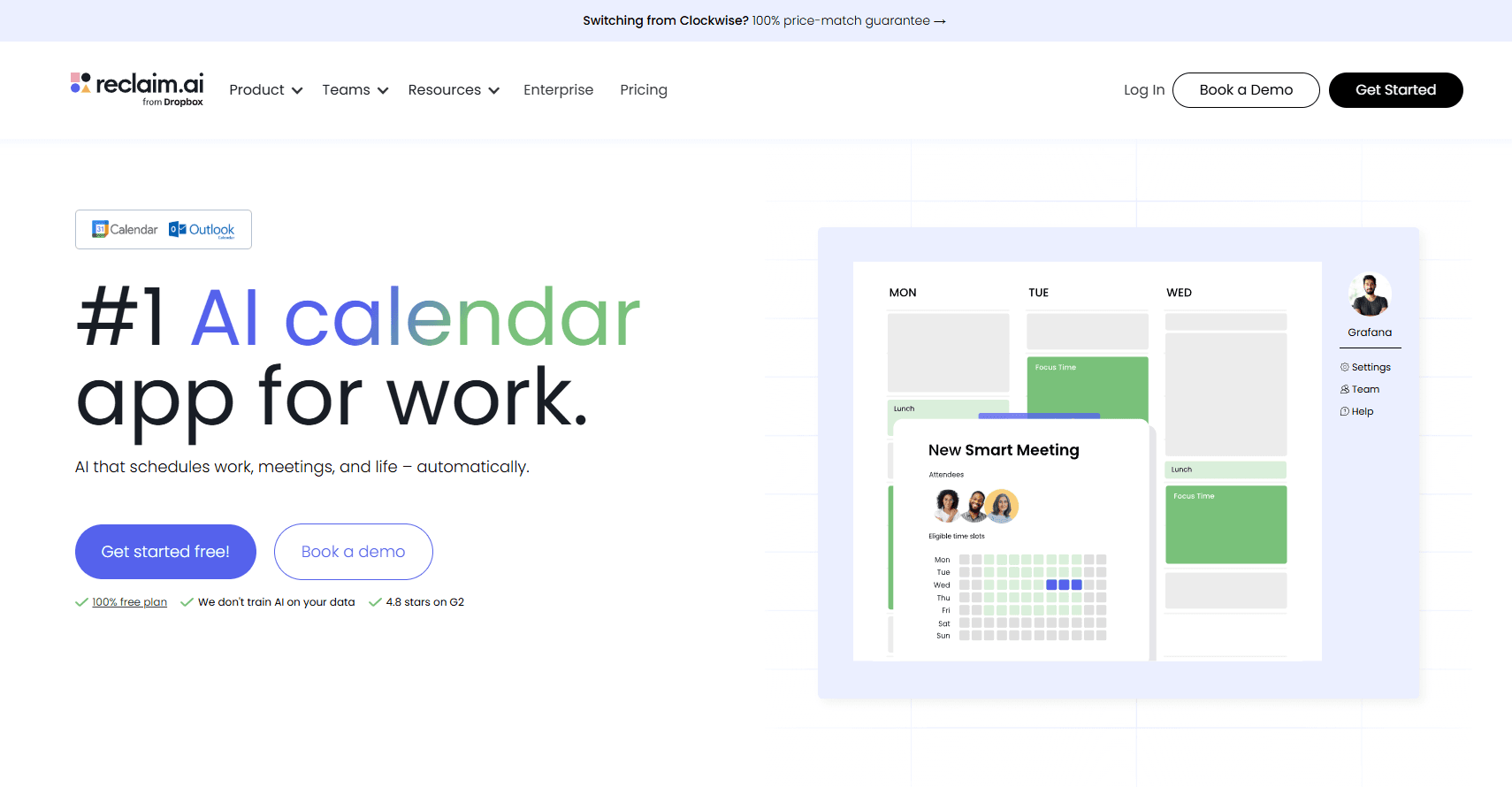
Reclaim.ai is an AI-powered scheduling platform designed to optimize your calendar by intelligently blocking out time for tasks, habits, and even meeting buffers. It integrates seamlessly with your primary calendar (Google Calendar or Outlook Calendar) and popular task managers to ensure your schedule reflects your true priorities, not just external meeting requests. Unlike traditional calendar tools that are passive, Reclaim.ai is proactive. It learns your preferences, adapts to changes, and dynamically reschedules blocks to ensure important work gets done and personal well-being is maintained. Founded on the principle of "smart scheduling," it aims to eliminate context switching, reduce meeting fatigue, and foster a healthier work-life balance.
The Onboarding Experience and UI/UX
Getting started with Reclaim.ai is remarkably straightforward. The initial setup process guides you through connecting your Google Calendar or Outlook Calendar, which is a mandatory first step. From there, you're prompted to define your working hours, meeting hours, and even "hard boundaries" – times when Reclaim.ai absolutely will not schedule anything. This foundational configuration takes less than 10 minutes. The user interface itself is clean, intuitive, and modern. The dashboard provides a clear overview of your upcoming week, highlighting scheduled habits, tasks, and meetings. Creating new habits or tasks is done through a simple modal, and the platform offers helpful tooltips and introductory guides for each feature. For a tool with such sophisticated underlying logic, its surface-level usability is excellent, making the learning curve surprisingly gentle for individual users. Teams might require a bit more coordination to align on best practices, but the core functionality is accessible from day one.
Key Features: A Deep Dive into Reclaim.ai's Capabilities
Reclaim.ai isn't just a fancy calendar blocker; it’s a sophisticated system built on several interconnected smart features. Here's a breakdown of its core offerings:
Smart Habits
This is arguably Reclaim.ai's flagship feature. Instead of manually blocking time for recurring activities like "exercise," "deep work," or "learning," Smart Habits allows you to define these activities with specific parameters. You tell Reclaim.ai what the habit is, how long it typically takes (e.g., 60 minutes), how often you want to do it (e.g., 3 times a week), and when it's ideal (e.g., "morning" or "between 9 AM and 12 PM"). Reclaim.ai then intelligently finds the best available slots in your calendar, dynamically moving them if new, higher-priority meetings come in. For example, if I set a "Deep Work" habit for 90 minutes, 4 times a week, and a new external meeting lands on one of those blocks, Reclaim.ai will automatically shift the Deep Work session to another optimal time, ensuring it still gets done. The flexibility here is crucial; you can prioritize habits (e.g., "Exercise" is higher priority than "Admin"), set minimum and maximum durations, and even mark them as "flexible" or "fixed." This feature alone is a game-changer for ensuring personal and professional development activities don't get sidelined by reactive scheduling.
Smart Tasks
Similar to Smart Habits, Smart Tasks takes your to-do list items and intelligently schedules them into your calendar. The real power here comes from its deep integration with popular task managers like Asana, Jira, Todoist, ClickUp, and Linear. When you connect an integration, your tasks from those platforms automatically appear in Reclaim.ai. You can then assign an estimated duration, a due date, and a priority level. Reclaim.ai will then find time blocks in your calendar to complete these tasks, breaking down larger tasks into smaller, manageable chunks if necessary. If a task is due soon and your calendar is packed, Reclaim.ai will prioritize finding time for it, even if it means rescheduling a lower-priority habit. This dynamic allocation of time for tasks significantly reduces the mental load of planning your day and ensures critical deliverables aren't missed. I found this particularly useful for managing my editorial calendar, where multiple articles and reviews need dedicated writing time.
Smart Meetings
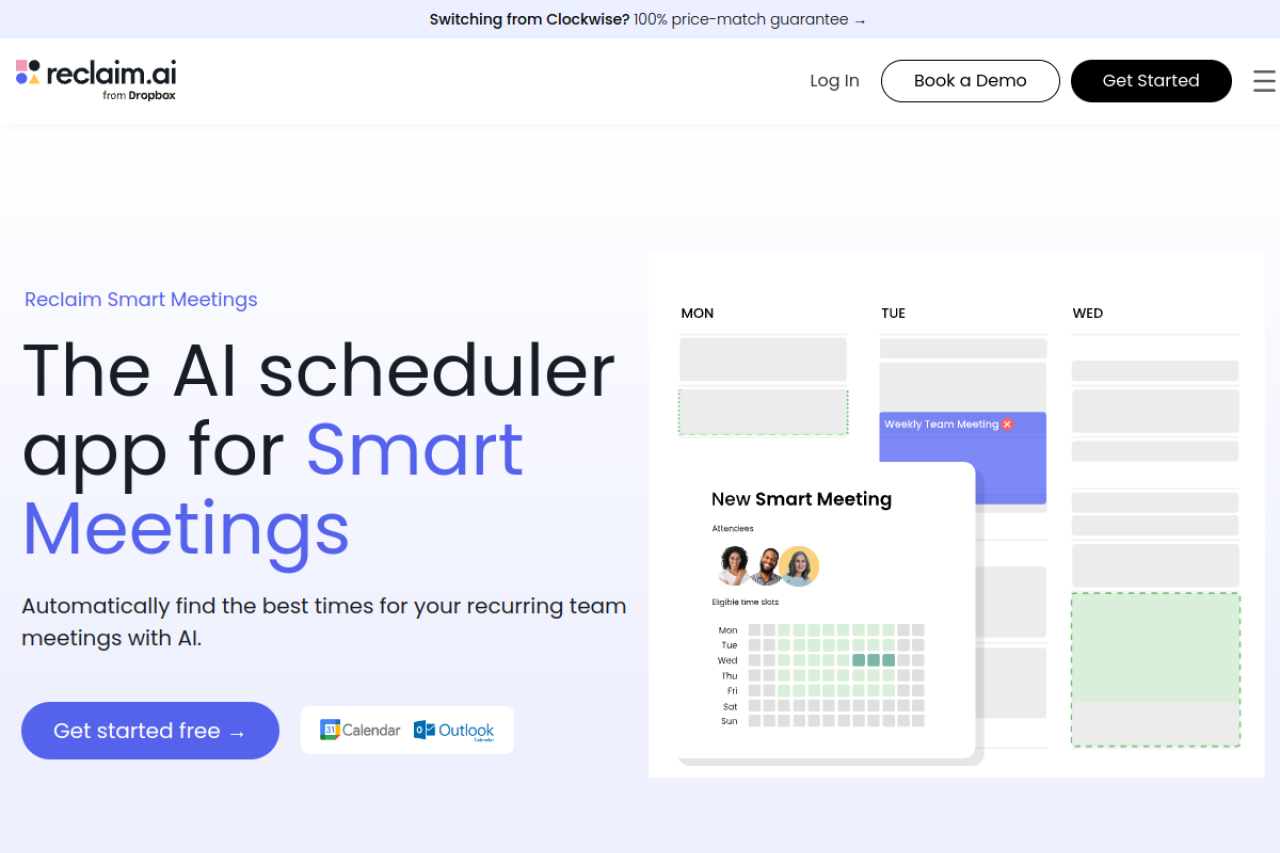
Reclaim.ai also optimizes how you schedule and attend meetings. Its Smart Meetings feature allows you to define preferred meeting times, maximum durations, and even buffer times around meetings. When someone uses your Reclaim.ai Scheduling Link (more on this below), Reclaim.ai only offers times that fit your preferences and automatically includes buffers. For internal team meetings, it can even analyze team members' calendars to find the absolute best time that minimizes disruption for everyone, reducing the back-and-forth email chains endemic to large organizations.
Meeting Buffers
This is a small but mighty feature that combats "meeting fatigue." Meeting Buffers automatically block out short periods (e.g., 15-30 minutes) before and after meetings. This allows for preparation, context switching, bio breaks, or simply a moment to decompress. You can customize the buffer duration and whether it applies to all meetings or just those over a certain length. I found that even a 15-minute buffer before a presentation significantly improved my focus and reduced stress.
Scheduling Links
Reclaim.ai provides personalized scheduling links that you can share with external parties. Unlike generic calendar tools, Reclaim.ai's links are intelligent. They only show availability based on your actual, dynamic calendar, including your habits, tasks, and meeting buffers. This means you'll never accidentally get double-booked or have to move a critical deep-work session for an external call. You can create different types of links for various meeting types (e.g., a 30-minute "Discovery Call" link or a 60-minute "Project Review" link), each with its own specific availability rules.
Google Calendar and Outlook Calendar Integration
These are the foundational integrations for Reclaim.ai. Without connecting to either Google Calendar or Outlook Calendar, the tool simply cannot function. It pulls all your existing events, understands your free/busy status, and writes all its dynamically scheduled blocks back to your chosen calendar. This ensures that your calendar remains the single source of truth, and your colleagues can see your true availability.
Task Manager Integrations (Asana, Jira, Todoist, ClickUp, Linear)
As mentioned, these integrations are key to the Smart Tasks feature. They allow Reclaim.ai to pull tasks directly from your project management tools, eliminating the need for manual entry. This creates a powerful synergy between your task list and your actual schedule. For a marketing team using Asana, for example, a task like "Draft Q3 Report" can be synced to Reclaim.ai, given a 2-hour estimate, and then intelligently scheduled into available slots, ensuring progress is made consistently.
Time Analytics & Reporting
Reclaim.ai offers insights into how you actually spend your time. This feature provides breakdowns of your time allocated to meetings, habits, tasks, and free time. While not as robust as dedicated time-tracking software, it gives a valuable overview of your workday distribution. For managers, this can be crucial for understanding team capacity and identifying areas for optimization.
Webhook Integrations & API Access
For more advanced users and enterprises, Reclaim.ai provides Webhook Integrations and a comprehensive API. This allows for custom connections with other internal systems, CRM platforms, or bespoke productivity tools. For example, a development team could use the API to automatically create a "bug fix" task in Reclaim.ai whenever a critical bug is reported in their internal issue tracker, ensuring immediate scheduling and attention.
Pricing: Is Reclaim.ai Worth the Investment in 2026?
Reclaim.ai operates on a freemium model, offering a generous free plan alongside paid tiers for individuals and teams. This allows users to experience the core functionality before committing financially.
Here's a breakdown of the pricing plans as of 2026:
- Lite (Free): This plan is perfect for individuals to get started. It includes unlimited Smart Habits (up to 30 minutes each), unlimited Smart Tasks (up to 30 minutes each), Meeting Buffers, and Scheduling Links. It supports Google Calendar and Outlook Calendar integration. The main limitation is the 30-minute duration cap for habits and tasks, which can be restrictive for deep work or complex projects.
- Starter ($8/user/month, billed annually, or $10/user/month billed monthly): Designed for individuals who need more flexibility. It removes the duration cap for Smart Habits and Smart Tasks, offers unlimited types of Habits and Tasks, priority support, and advanced calendar controls. This is the sweet spot for most power users.
- Business ($15/user/month, billed annually, or $18/user/month billed monthly): Geared towards small teams and organizations. It includes everything in Starter, plus Team Scheduling features (e.g., finding optimal meeting times for multiple people), Team Habits & Tasks, centralized billing, and admin controls. You also get access to more advanced reporting and analytics.
- Enterprise (Custom Pricing): For larger organizations with specific needs. This plan includes all Business features, dedicated account management, custom integrations via Webhooks and API, enhanced security features, and compliance support.
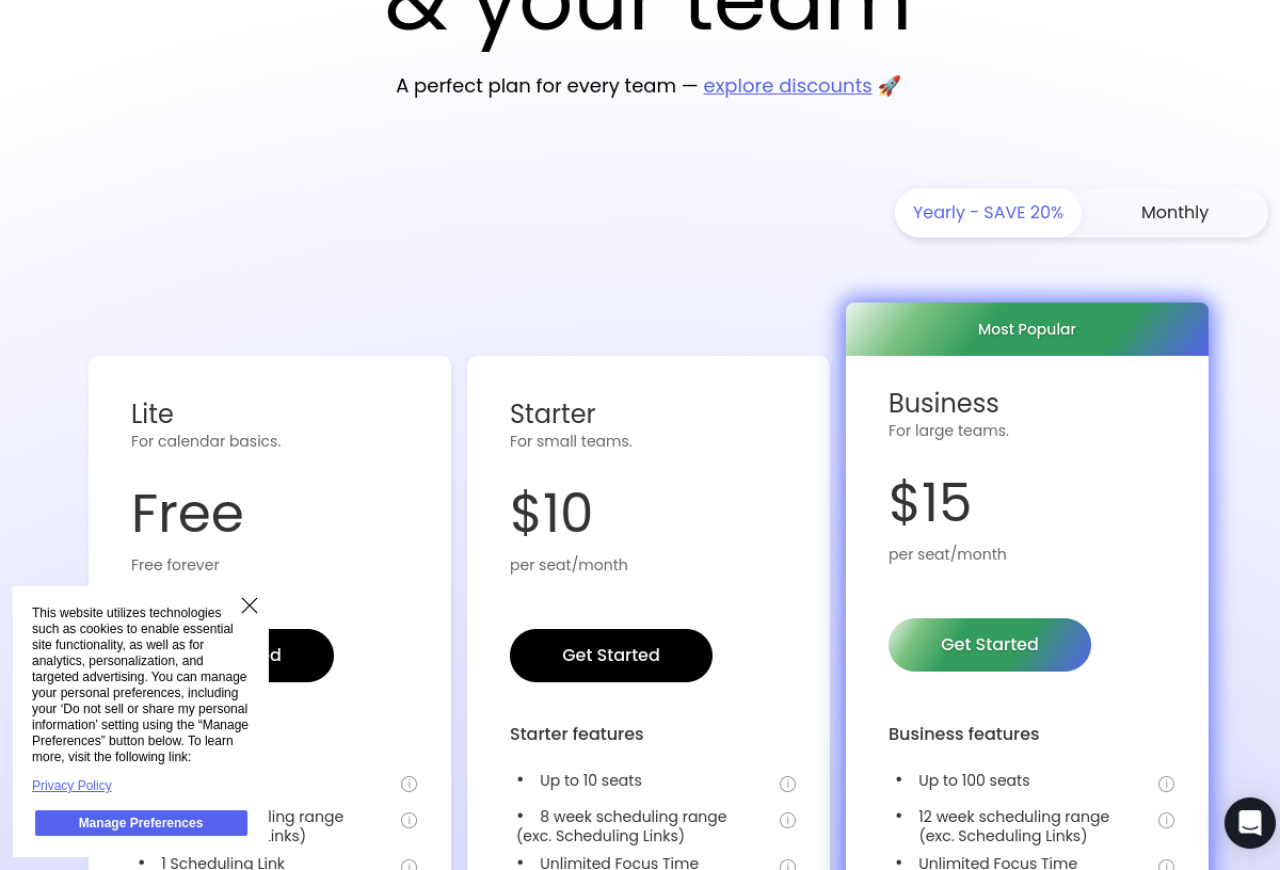
Considering the time saved and the reduction in mental overhead, the Starter plan at $8/month is a strong value proposition for individuals whose time is valuable. For teams, the Business plan at $15/month per user offers significant collaboration benefits, especially in reducing internal meeting friction.
Integrations: Connecting Your Workflow
Reclaim.ai's strength is amplified by its ability to integrate with your existing tech stack. Beyond the essential Google Calendar and Outlook Calendar connections, its support for major task management tools is critical:
- Google Calendar: Primary calendar integration.
- Outlook Calendar: Primary calendar integration.
- Asana: Syncs tasks for Smart Task scheduling.
- Jira: Syncs issues/tasks, ideal for development teams.
- Todoist: Popular task manager integration for personal and professional use.
- ClickUp: Comprehensive work OS integration for tasks.
- Linear: Modern issue tracking and project management for software teams.
- Slack: For notifications and quick actions (e.g., marking a habit complete).
- Zoom/Google Meet/Microsoft Teams: Automatically adds video conferencing links to scheduled meetings.
- Webhook Integrations & API Access: For custom connections with virtually any other system, offering unparalleled flexibility for enterprise environments.
Pros & Cons: An Honest Assessment
Pros:
- Truly Intelligent, Dynamic AI Scheduling: This isn't just a static blocker. Reclaim.ai learns and adapts, ensuring your priorities are always reflected in your calendar, even as external demands shift. This dynamic rescheduling for habits and tasks is its core differentiator.
- Significantly Reduces Context Switching and Meeting Fatigue: Meeting Buffers are a revelation, providing essential breathing room between back-to-back calls. Smart scheduling also reduces the need to constantly re-evaluate your day.
- Seamless Integration with Major Task Managers: The ability to pull tasks directly from Asana, Jira, Todoist, ClickUp, and Linear transforms your to-do lists into actionable calendar blocks. This is a massive productivity boost.
- Intuitive and User-Friendly Interface: Despite its complex underlying AI, the UI/UX is clean, modern, and easy to navigate. Onboarding is quick and painless.
- Actively Promotes Work-Life Balance: By prioritizing and protecting time for habits like exercise, learning, or personal errands, Reclaim.ai encourages a healthier approach to work.
- Robust Features for Optimizing Team Collaboration: The Business plan's team scheduling capabilities (finding optimal meeting times, shared habits) significantly streamline internal coordination and reduce scheduling friction.
- Generous Free 'Lite' Plan: Allows individuals to experience the core benefits without financial commitment, making it highly accessible.
- Comprehensive API for Custom Integrations: For organizations with unique workflows, the API opens up a world of possibilities for bespoke automation and data synchronization.
Cons:
- Requires Initial Time Investment for Optimal Setup: While onboarding is easy, getting the most out of Reclaim.ai means carefully defining your habits, task priorities, and working hour preferences. This setup phase can take a few hours to fine-tune.
- Strictly Reliant on Google Calendar or Outlook Calendar Integration: If you use another primary calendar system (e.g., Apple Calendar without Google/Outlook sync), Reclaim.ai is not an option for you.
- Lite Plan Has Duration Limits (30 mins) for Habits and Tasks: For users with deep work requirements or longer tasks, the 30-minute cap on the free plan can be a significant limitation, pushing them towards the Starter plan.
- No Native Mobile Application (as of 2026): Reclaim.ai relies on a mobile-responsive web app. While functional, it lacks the native feel and specific mobile-OS integrations (like widgets or background sync optimizations) that some users might prefer. This is a notable gap in its ecosystem.
- Potential for Calendar to Appear Overly Full if Not Managed Carefully: If you set too many high-priority habits and tasks, your calendar can quickly become densely packed, potentially overwhelming at a glance. Users need to be mindful of their capacity and adjust priorities accordingly.
Who Is It For? Practical Use Cases
- Individual Knowledge Workers (Freelancers, Consultants, Developers, Marketers): Anyone whose day is a mix of meetings, focused work, and recurring tasks will find immense value. For example, a freelance developer balancing client calls with coding sprints can use Smart Tasks from Jira and Smart Habits for "Deep Coding Time" to ensure productivity.
- Managers and Team Leads: The Business plan's team features are excellent for reducing internal meeting overhead. A marketing team of 5, for instance, can use Reclaim.ai to find the best time for their weekly sprint planning, ensuring it avoids everyone's critical client calls and includes buffer time for preparation.
- Anyone Struggling with Work-Life Balance: By actively scheduling and protecting time for personal habits (exercise, family time, learning), Reclaim.ai helps users reclaim personal time often lost to an overflowing work calendar.
- Teams Using Specific Task Managers: Organizations heavily invested in Asana, Jira, Todoist, ClickUp, or Linear will particularly benefit from the seamless integration of their tasks directly into their calendar.
- Enterprise Organizations with Complex Scheduling Needs: With its API and webhook capabilities, larger companies can integrate Reclaim.ai into bespoke systems for advanced workforce scheduling, project management, or even resource allocation.
Alternatives: How Does Reclaim.ai Stack Up?
While Reclaim.ai offers a unique blend of features, it operates in a space with other productivity tools. Here’s how it compares to some notable alternatives:
- Calendly / SavvyCal / Acuity Scheduling: These are primarily focused on external meeting scheduling. While Reclaim.ai offers Scheduling Links, its core strength lies in internal schedule optimization (habits, tasks, buffers). You might use Calendly for advanced external booking features, but Reclaim.ai handles the dynamic internal allocation of your time far better.
- Clockwise: Clockwise is perhaps Reclaim.ai's closest competitor, also focusing on intelligent calendar optimization for teams. Clockwise excels at finding "Focus Time" for teams and optimizing meeting times. Reclaim.ai often feels more granular in its control over individual habits and tasks, and its integration with a wider array of task managers (especially Linear and ClickUp) gives it an edge for some users. Clockwise also tends to be more aggressive in moving meetings, which can be a pro or con depending on team culture.
- Motion: Motion is another AI-powered assistant that aims to plan your entire day. It's more of a comprehensive project manager and daily planner that integrates with your calendar. While Motion handles tasks and meetings, Reclaim.ai's focus on dynamic calendar protection for habits and tasks, and its deeper integrations with dedicated task managers, make it distinct. Motion aims to be an all-in-one planner, whereas Reclaim.ai excels as a calendar-centric optimizer.
- Manual Calendar Blocking: The old-school method. Reclaim.ai fundamentally replaces the need to manually block out time, constantly reschedule, and juggle priorities. It’s a quantum leap over manual effort.
Reclaim.ai differentiates itself by its deep integration into existing task management workflows and its proactive, dynamic rescheduling capabilities for both habits and tasks, ensuring that personal and professional growth activities are actively prioritized rather than just passively blocked.
Verdict: Is Reclaim.ai Worth It in 2026?
After extensive testing, I can confidently say that Reclaim.ai is more than just another productivity tool; it's a fundamental shift in how you can approach time management in 2026. Its intelligent AI-driven scheduling for habits and tasks, combined with crucial features like Meeting Buffers and robust task manager integrations, genuinely empowers users to take control of their calendars. It moves beyond simply showing you what's on your plate to actively ensuring you have the time to eat it. While the lack of a native mobile app is a minor drawback, the mobile-responsive web experience is perfectly usable.
For individuals constantly battling an overflowing inbox and a disjointed calendar, the Starter plan is an excellent investment. For teams struggling with meeting overload and inefficient scheduling, the Business plan offers tangible benefits in terms of cohesion and reduced friction. The initial setup requires a bit of thoughtful input, but the long-term gains in productivity, reduced stress, and improved work-life balance are substantial. Reclaim.ai effectively acts as a personal chief of staff for your schedule, making it an indispensable tool for anyone serious about optimizing their time.
If you're tired of your calendar dictating your day and want to regain control, Reclaim.ai is absolutely worth exploring. Start with the free Lite plan to experience its core magic, and I predict you'll quickly see the value in upgrading to unlock its full potential.